
Showing posts with label Tutorial. Show all posts
Showing posts with label Tutorial. Show all posts
Monday, November 12, 2012
Creating Old Polaroids in Photoshop
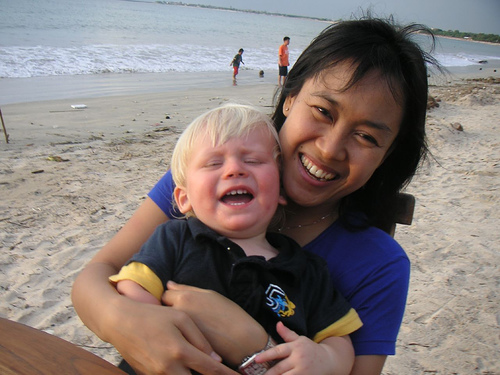
Alright guys, let's start out by picking out a picture we want to
use. Generally this effect works best with portraits, I've picked one I
found off of my friend Callum's Photostream of his son, Oscar!
Right, now you're going to want to find a stock photograph of a
Pol

A Scrap Of Notebook Paper
Step 1
Lets begin by opening a new document in Photoshop by selecting File>New from the Main Menu. My file size is 540x300px at 72ppi for those of you following along at home. Because our notepad paper will be white, lets begin by changing the document’s background color.With the new document open, click on the foreground swatch in the Tools palette to bring up the color picker. Pick a background color that you like and that will be easy to see the white paper against (I chose #e9dfb8, which you can type in the box at the bottom of the color picker). Now simply press Option-Delete (PC: Alt-Backspace) to fill the Background layer with this new color.

Step 2
Lets go aheadPeeling Sticker Effect
First, you want to start with your object on it’s own layer. If you need help getting your object on it’s own layer check out this quick tutorial on masking.
 Add a background layer by holding [Ctrl] + [Alt] and clicking on the
New Layer button at the bottom of the Layers Palette [F7]. Press [D] to
select the default colors and press [Ctrl + Backspace]
Add a background layer by holding [Ctrl] + [Alt] and clicking on the
New Layer button at the bottom of the Layers Palette [F7]. Press [D] to
select the default colors and press [Ctrl + Backspace]
Saturday, November 3, 2012
Apa Itu Alexa Rank

“The traffic rank is based on three months of aggregated historical traffic data from millions of Alexa Toolbar users and data obtained from other, diverse traffic data sources, and is a combined measure of page views and users. As a first step, Alexa computes the reach and number of page views for all sites on the Web on a daily basis. The main Alexa traffic rank is based on a value derived from these two quantities averaged over time (so that the rank of a site reflects both the number of users who visit that site as well as the number of pages on the site viewed by those users). The three-month change is determined by comparing the site's current rank with its rank from three months ago. For example, on July 1, the three-month change would show the difference between the rank based on traffic during the first quarter of the year and the rank based on traffic during the second quarter.”
(Untuk terjemahannya dalam bahasa indonesia anda dapat menggunakan google translate.)
Jadi Alexa Rank itu adalah sebuah rangking yang diberikan Alexa kepada pemilik blog atau pemilik website berdasarkan jumlah pengunjung. Semakin kecil Rangking Alexa, maka akan semakin tinggilah posisi website tersebut di mata alexa. Rangking alexa nomor 1 saat ini di pegang oleh google dan disusul oleh facebook pada rangking nomor 2.
Semoga artikel Apa Itu Alexa Rank bermanfaat bagi teman-teman blogger semua.
(Sumber: http://roemario-worlds.blogspot.com/2012/08/apa-itu-alexa-rank.html)
Friday, November 2, 2012
TRIK!! 99% MENANG BET HEAD&TAIL LIBERTY RESERVE

TRIK JITU buat game head or tail!!
Strategi 99% Win!!!
(Tanpa Daftar alias Langsung Bayar)
Jika tidak 2x atau 210%, maka 100% win menjadi tidak berlaku! Dan yang dimaksud 100% Win bukan berarti anda tak pernah kalah! Anda mungkin kalah beberapa kali, tapi anda tak akan pernah rugi, karena setiap kekalahan anda akan terbayar oleh sekali anda menang berikutnya! Ya, sekali anda menang kekalahan anda yang tadi tertutupi plus anda akan dapatkan keuntungannya! Sebelum anda memasuki bagian game.
Anda sebaiknya memahami logika ini! Ini logikanya: Bayangkan! Berapa besar kemungkinan jika anda melempar koin 14 kali berturut-turut hasilnya sama terus? Tak mungkin Anda kalah 14x berturut
Wednesday, October 31, 2012
What is Adobe Photoshop CS?
Haiiiiii.... kali ini saya akan membagian Tutorial Photoshop :)
Semoga berguna buat anda semua yang lagi membutuhkan.

Pengertian Photoshop CS
Photoshop adalah software yang digunakan untuk memodifikasi gambar atau foto secara profesional baik meliputi modifikasi obyek yang sederhana maupun yang sulit sekalipun. Photoshop merupakan salah satu software yang berguna untuk mengolah gambar berbasis bitmap, yang mempunyai tool dan efek yang lengkap sehingga dapat menghasilkan gambar atau foto yang berkwalitas tinggi (jika ingin lebih jauh mengetahui tentang gambar berbasis bitmap silakan download dokumennya di sini).
Kelengkapan fitur yang ada di dalam Photoshop inilah yang akhirnya membuat software ini banyak digunakan oleh desainer grafis profesional. Dan mungkin juga sampai saat ini masih belum ada software desain grafis lain yang bisa menyamai kelengkapan fitur dalam Photoshop.
Tutorial Lengkap CorelDraw untuk Pemula

Ilmu Grafis Tutorial Memulai CorelDraw untuk pemula berisi pengenalan dan panduan dasar dalam belajar komputer desain. Sebelum kita memulai tutorial CorelDraw, akan lebih baik jika kita mengetahui apa saja yang terkandung didalamnya.
Coreldraw adalah sebuah
software pengolah Vektor berupa garis dan bidang yang diolah
berdasarkan pengaturan-pengaturan angka-angka vektor.
Subscribe to:
Posts (Atom)